
下面开始对IP security进行配置(以FTP服务为例,TELNET等其他端口的服务类似)
1. 启动IP安全(IPSec):
# smitty ipsec4-> Start/Stop IP Security----> Start IP Security ->Start IP Security
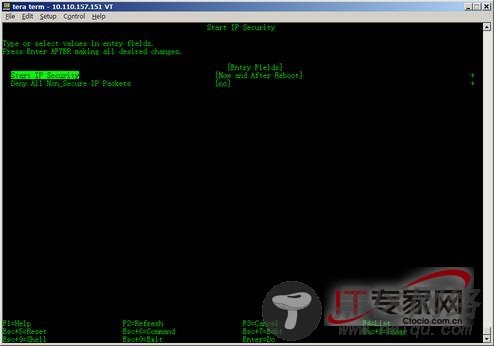
上面两项的设置均使用缺省值
2. 检查ipsec是否可用:
# lsdev -Cc ipsec
ipsec_v4 Available IP Version 4 Security Extension
3. 现在系统中应创建了两个过滤规则。使用下面的命令检查这两个过滤规则:
# lsfilt -v4
正常情况下可以看到2条规则,如果提示无任何缺省规则,请参考本节的注解。
4. 增加一个过滤规则以允许接受从10.152.129.49发来的ftp请求:
# smitty ipsec4---> Advanced IP Security Configuration------> Configure IP Security Filter Rules---------> Add an IP Security Filter Rule ->Add an IP Security Filter Rule
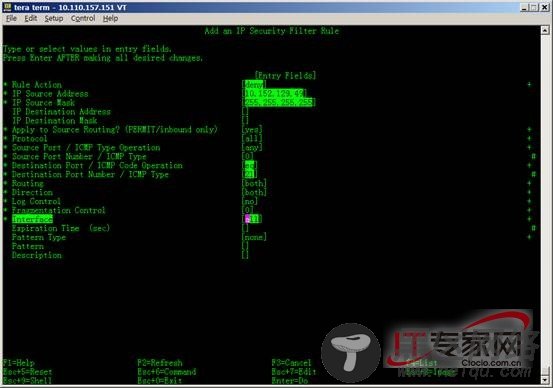
* Rule Action -----------------------------------[permit] +
* IP Source Address -----------------------------[10.152.129.49]
* IP Source Mask --------------------------------[255.255.255.255]
IP Destination Address --------------------------[]
IP Destination Mask ---------------------------- []
* Apply to Source Routing? (PERMIT/inbound only) [yes]+
* Protocol --------------------------------------[all]+
* Source Port / ICMP Type Operation -------------[any]+
* Source Port Number / ICMP Type ----------------[0] #
* Destination Port / ICMP Code Operation --------[eq]+
* Destination Port Number / ICMP Type -----------[21] #
* Routing ---------------------------------------[both] +
* Direction -------------------------------------[both]+
* Log Control -----------------------------------[no]+
* Fragmentation Control -------------------------[0]+
* Interface -------------------------------------[all] +
其他缺省值